Contact centers that rely on disconnected systems pay a high price: agents switching between five different screens, rising wait times, and customers repeating their issue on every call.
A CRM for call centers solves that problem by centralizing all customer information and management tools in a single environment, visible from the very first second of every interaction.
This guide covers what a CRM designed for contact centers is, its critical functions, how to measure its impact on operational KPIs, and which criteria to use when choosing the right platform for your operation.
1. What a CRM for call centers is and how it differs from a sales CRM
A sales CRM manages leads, pipelines, and opportunities. A CRM for call centers does something different: it consolidates all service channels — voice, chat, email, and messaging — into a single customer timeline, available in real time to the agent receiving the call.
The operational difference is concrete. When a customer calls your contact center, the agent should not have to ask, “How can I help you, and what is your customer number?” With a properly integrated CRM, that information appears automatically at the moment of contact, thanks to CTI integration, or Computer Telephony Integration. This eliminates the first 30 to 60 seconds of each call usually spent identifying the customer.
The other key differentiator is omnichannel capability. A customer can start an inquiry through chat, continue by phone, and escalate by email. The CRM for call centers records all of that in a single view. Without that unified record, each channel creates its own data silo, producing inconsistencies and forcing the customer to repeat context.
For operations looking to go beyond traditional CRM, AI-powered automated customer service can resolve frequent inquiries without human intervention, reducing the volume of calls that reach agents.
2. Critical functions of a CRM for call centers
Not all CRMs are equivalent when evaluated from a contact center perspective. The following functions have the greatest impact on agent efficiency and customer experience.
Predictive dialer
A predictive dialer automates outbound calls by calculating the dialing pace in real time based on agent availability and historical answer rates. The result is less idle time between calls and a higher number of effective contacts without increasing headcount.
CTI integration
Computer Telephony Integration connects the phone system with the CRM and allows the agent to manage calls without leaving the platform. When a call comes in, the CRM automatically displays the customer profile, interaction history, and pending actions. This eliminates task-switching between systems and improves registration accuracy.
The most common CTI integrations in the B2B market are compatible with VoIP infrastructure from Avaya, Cisco, Genesys, and Mitel, making adoption easier without replacing existing telephony.
CRM-integrated IVR
An intelligent IVR system connected to the CRM does two things: it filters calls to reduce traffic reaching agents, and it feeds the unified timeline with the contact reason captured in the menu. That way, when the call escalates to an agent, the agent already has context before answering.
Intelligent routing
Intelligent routing assigns each interaction to the most suitable agent based on configurable criteria: specialty, availability, previous history with the customer, or urgency level. Well-configured routing increases first-contact resolution, or FCR, and reduces wait times without requiring more agents.
Unified agent desktop
A unified desktop consolidates voice, chat, email, and social media into a single interface. The agent sees all customer information without switching screens. This has a direct impact on AHT, or average handle time, because it eliminates manual data searches during the call.
Real-time reporting and analytics
Supervisors need to see KPIs in real time to detect bottlenecks before they become incidents. A good CRM offers configurable dashboards that measure everything from individual productivity to customer satisfaction by channel.
3. KPIs a CRM for call centers should improve
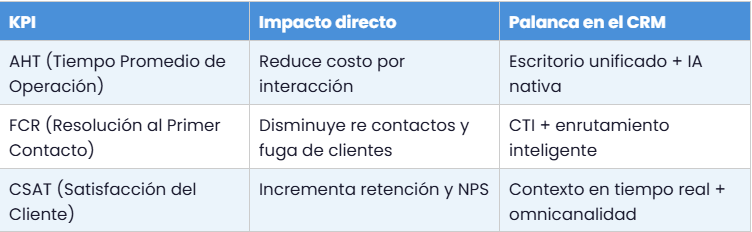
The business case for any CRM depends on its impact on measurable indicators. The three most important KPIs in contact center operations are:
AHT reduction
AHT includes conversation time plus the work performed after the call ends, known as After Call Work. A CRM with a unified desktop and native AI reduces both components: the agent finds information faster during the call, and the system automatically records activities after closure.
Every second saved per call multiplies across daily interaction volume. In operations with 500 daily calls, reducing AHT by 30 seconds releases more than 4 hours of operational capacity per day.
FCR improvement
FCR measures whether the customer’s issue was resolved in the first contact. A CRM with intelligent routing and real-time context improves this indicator because the right agent receives the right call with complete information.
Each percentage point of improvement in FCR reduces repeat contacts and the associated operating cost.
For operations where repeat contacts are related to collections management, AI-powered collections automation provides a direct complement to the CRM by reducing repeated calls about the same case.
4. How to choose the right CRM for your operation
Choosing a CRM for a call center is not just about comparing features in a spreadsheet. The criteria that determine the success or failure of the implementation are more operational and strategic.
Scalability without degradation
The CRM must support operational growth without requiring expensive migrations. Prioritize SaaS architectures with open APIs that allow new systems to be connected without modifying the core structure. Ask the provider directly what the concurrent transaction limit is and how the platform behaves as it approaches that limit.
Agent UX
A poorly designed interface increases the learning curve, raises registration errors, and contributes to staff turnover. The unified desktop should minimize the number of clicks required to access customer information and allow activity logging without interrupting the call. Request a demo using a real use case from your operation, not sample data.
Reporting capabilities without IT dependency
Supervisors and operations managers need access to metrics without opening IT tickets. Evaluate whether the CRM allows users to create custom dashboards and export reports directly from the user interface, without additional technical configuration.
Local support and adapted billing
Spanish-language support with coverage during local business hours is critical for resolving incidents quickly. Also verify that the provider offers billing in local currency, since this directly affects budget approval and administrative management for IT and finance teams.
Integrations with your current stack
Before making a final decision, map all the systems the CRM must connect to: telephony platform, helpdesk tools, marketing automation systems, and ERP. The absence of native integrations is not necessarily a blocker, but it increases implementation cost and technical risk.
5. Risk-free implementation: roadmap for contact centers
CRM implementations usually fail for the same reasons: poorly migrated data, insufficient training, and lack of a pilot phase. The following flow reduces those risks.
Step 1: Data audit and cleanup
Before migration, audit the existing data in current systems. Identify duplicates, incomplete records, and conflicting sources. The quality of data in the new CRM depends directly on what is migrated. There is no magical migration that cleans messy data automatically.
Step 2: Configuration and integrations
Connect the CRM with telephony through CTI, email, chat, and other critical systems. Define whether synchronization will happen in real time or in batches depending on the use case. Document each integration with the corresponding security protocols.
Step 3: Controlled pilot
Launch the CRM with a small group of agents and supervisors before the general rollout. The goal is to detect friction in workflows, validate that the native AI and LLM capabilities work according to real use cases, and measure the initial impact on AHT and FCR.
Step 4: Phased training
Train supervisors first so they can act as support references for the team. Training should cover both operational CRM use and interpretation of key metrics. A single four-hour session is not enough to change work habits.
Step 5: Continuous monitoring and adjustment
A CRM is not a project that ends at go-live. Establish a monthly cycle to review KPIs, collect team feedback, and adjust configurations. The call centers that get the most value from their CRM treat the platform as a living system, not a fixed installation.
Frequently asked questions
What is the difference between a sales CRM and a CRM for call centers?
A sales CRM manages pipelines, leads, and business opportunities. A CRM for call centers is designed to centralize multichannel interactions in real time, with specific tools such as CTI, IVR, routing, and a unified agent desktop. Both can coexist or integrate, but they follow different operational logic.
What is AHT and why does it matter in a contact center?
AHT, or Average Handle Time, measures the total duration of an interaction, from the moment the agent answers until the case is closed. A high AHT indicates workflow inefficiencies or lack of available information. Reducing AHT without affecting resolution quality is one of the main goals of a CRM for contact centers.
What is FCR and how does a CRM improve it?
FCR, or First Contact Resolution, measures how many cases are resolved in the first contact without follow-ups or escalations. A CRM improves FCR by routing each interaction to the right agent and giving them complete customer context from the beginning of the call.
Does a CRM for call centers work with conversational AI?
Yes. Modern CRMs integrate AI modules that assist agents in real time with response suggestions, automatic contact reason classification, and next-best-action recommendations. Some also connect with voicebots or chatbots that handle inquiries before escalating to a human agent.
How long does it take to implement a CRM in a call center?
It depends on the size of the operation and the complexity of the integrations. A basic implementation with a SaaS CRM can be operational in 4 to 8 weeks. Operations with multiple legacy systems and high volumes of historical data may require 3 to 6 months for a full implementation.
Which KPIs should I measure to evaluate implementation success?
The key indicators are AHT, FCR, and CSAT. It is also useful to measure call abandonment rate, average wait time, repeat contact rate, and system adoption by the team. A decrease in AHT combined with an improvement in FCR is usually the clearest sign that the implementation is moving in the right direction.
Next step
If your operation still manages interactions through disconnected systems or your team loses time searching for information during calls, it is time to evaluate a more efficient solution.
Vozy offers AI-powered IVR and contact automation that integrate with the most widely used CRMs in LATAM. Request a demo with your real use case and evaluate the impact on your operation.


%2010.46.13%20a.m..png)